
Raw HTML vs Rendered DOM: What SEO Crawlers and AI Bots Actually See
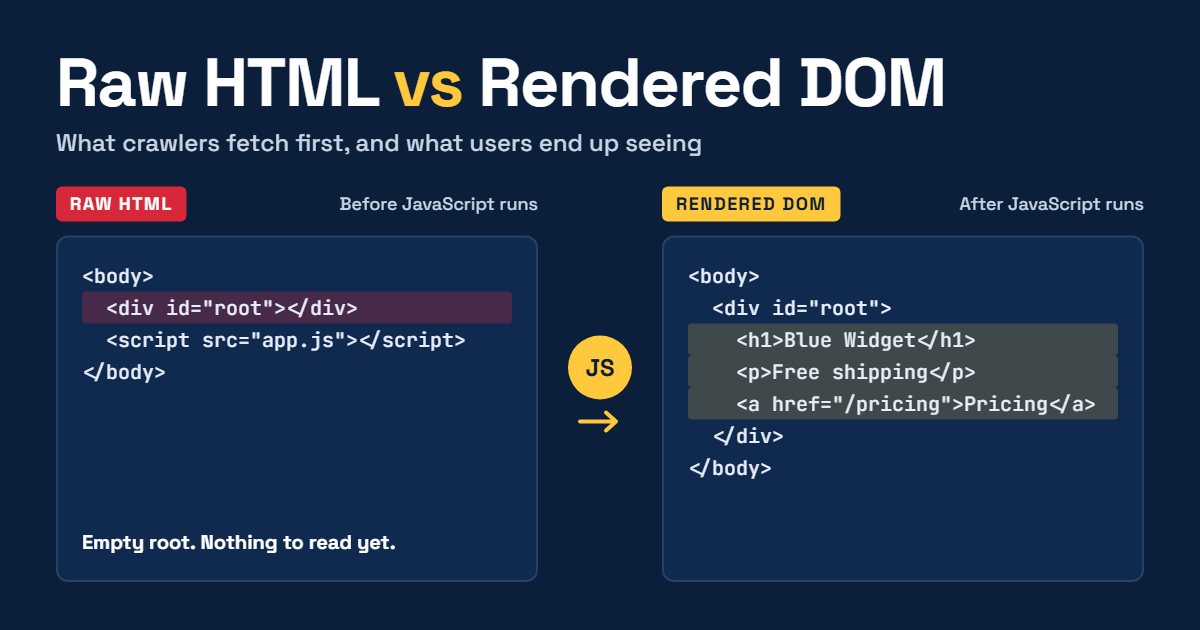
Open any modern site, press View Source, then open DevTools Elements. If those two views look very different, search engines and AI crawlers may not be seeing the page you think you shipped.
This matters more in 2027 than it did a few years ago. Google can render JavaScript, but rendering can be delayed or fail. Many AI crawlers do not render JavaScript at all. If your main content, internal links, or canonical tag only exist after hydration, some of the systems that decide your visibility will never see them.
Here are two checks you can run in a few minutes, and how site audit tools handle them.
Check 1: raw HTML vs rendered DOM
The idea: fetch the page twice, once as plain HTML (what a non-rendering crawler gets) and once in headless Chromium (what a rendering crawler gets), then compare the things SEO depends on.
import re
import sys
import urllib.request
from playwright.sync_api import sync_playwright

URL = sys.argv[1]

def signals(html):
    title = re.search(r"<title[^>]*>(.*?)</title>", html, re.S | re.I)
    canonical = re.search(r'<link[^>]+rel=["\']canonical["\'][^>]*>', html, re.I)
    return {
        "title": title.group(1).strip() if title else None,
        "canonical": bool(canonical),
        "links": len(re.findall(r"<a\s[^>]*href=", html, re.I)),
        "h1": len(re.findall(r"<h1[\s>]", html, re.I)),
        "words": len(re.sub(r"<[^>]+>", " ", html).split()),
    }

req = urllib.request.Request(URL, headers={"User-Agent": "Mozilla/5.0 (audit check)"})
raw = urllib.request.urlopen(req).read().decode("utf-8", "replace")

with sync_playwright() as p:
    browser = p.chromium.launch()
    page = browser.new_page()
    page.goto(URL, wait_until="networkidle")
    rendered = page.content()
    browser.close()

r, d = signals(raw), signals(rendered)
for key in r:
    flag = "" if r[key] == d[key] else "   <- differs"
    print(f"{key:10} raw={r[key]!s:12} rendered={d[key]!s:12}{flag}")
What to look for:
- Links much higher in rendered: navigation or related links are injected by JavaScript. Non-rendering crawlers can't follow them, which can create orphan pages.
- Canonical missing in raw: a canonical added client-side may be ignored or picked up late.
- Word count much higher in rendered: your main content depends on JavaScript. AI crawlers that don't render may see an empty shell.
- Different titles: the raw title is what many bots and link previews use.
Run it on one URL per template (home, category, product, article), not just the homepage.
Check 2: AI crawler access in robots.txt
Python's standard library can evaluate robots.txt rules for any user agent:
import sys
from urllib.robotparser import RobotFileParser

site = sys.argv[1].rstrip("/")
path = sys.argv[2] if len(sys.argv) > 2 else "/"

agents = [
    "Googlebot", "Bingbot",
    "GPTBot", "OAI-SearchBot", "ChatGPT-User",
    "ClaudeBot", "Claude-SearchBot", "Claude-User",
    "PerplexityBot", "CCBot",
    "Google-Extended", "Applebot-Extended",
]

rp = RobotFileParser(site + "/robots.txt")
rp.read()
for agent in agents:
    status = "allowed" if rp.can_fetch(agent, site + path) else "BLOCKED"
    print(f"{agent:18} {status}")
When reading the output, remember these are not all the same kind of thing:
- GPTBot, ClaudeBot, CCBot crawl content, mostly for model training.
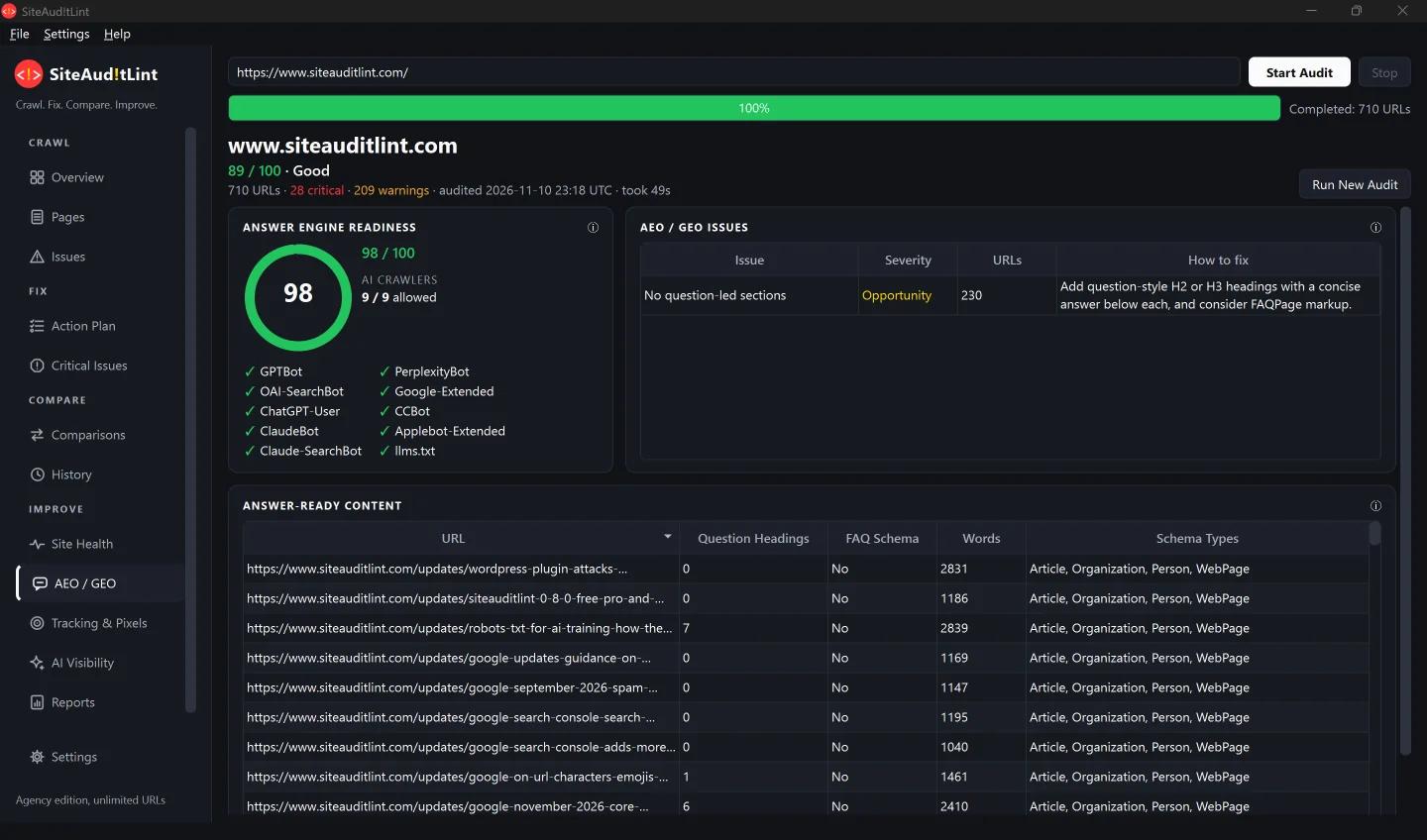
- OAI-SearchBot, Claude-SearchBot, PerplexityBot crawl for AI search and answers. Block these and you're unlikely to be cited.
- ChatGPT-User, Claude-User fetch a page when a person asks the assistant to. They don't crawl on their own.
- Google-Extended, Applebot-Extended aren't bots. They're robots.txt control tokens that tell Google and Apple whether your content may be used for AI training. Googlebot and Applebot still crawl for search either way.
So "block AI training, stay visible in AI search" is a valid configuration, but only if you write the rules for the right agents. A broad User-agent: * disallow, or a CDN bot rule returning 403s, can block all of them by accident.
About llms.txt: it's a reasonable forward-looking file to publish, but no major AI search engine has publicly confirmed using it yet. Don't treat it as a substitute for crawlable HTML.
How site audit tools handle this
If you audit sites regularly, you'll want this built into your crawler rather than run by hand:
| Tool | JavaScript rendering | AI crawler checks |
|---|---|---|
| Screaming Frog SEO Spider | Yes (paid licence) | Custom robots.txt testing |
| Sitebulb | Yes | Via robots.txt analysis |
| Ahrefs, Semrush, SE Ranking | Yes (varies by plan) | Partial, varies by tool |
| Lumar | Yes | Enterprise configuration |
| SiteAuditLint | Optional Chromium rendering | Built-in AEO / GEO panel: AI crawler access, llms.txt, question-led content |
One practical tip: rendered crawls are slower and heavier on the server. Run a raw HTML crawl by default, and turn rendering on for templates where Check 1 shows a gap. Then keep the setting the same between audits, or your crawl comparisons will show fake changes.
Disclosure: we build SiteAuditLint. For a full comparison of eight site audit tools, including pricing, fix verification, and when to choose each, see which site audit tools render JavaScript and verify fixes.
About the author
- Rem runs Azifind.com and has spent 15+ years in technical SEO and web development, focused on Philippine local search and business data.
Comments
Join the discussionNo comments yet. Be the first to comment.